BYTEROT - retro PCs, consoles and lost software
homearticleshow-toswhat's newlibraryrepaircommunityconnectcontributelinks
» ftp ftp.byterot.net  ::  irc #retro on irc.fxnet.org (3 here)  ::  2,186 releases  ::  25,577 library files18.11.2026
MAIN MENU::
HOME01
ARTICLES02
HOW-TOS03
WHAT'S NEW04
LIBRARY05
> REPAIR06
COMMUNITY07
CONNECT08
CONTRIBUTE09
LINKS10

GET AN ACCOUNT::
Accounts are free. Join #retro on irc.fxnet.org, identify with NickServ and type !req.
[how]

IRC::
#retro on irc.fxnet.org
6697 ssl · 6667 plain
modern + vintage clients welcome
[vintage how-to]

WHO'S AROUND::
3 people in #retro
okawari, synmuffin, thelounge76
nobody on the FTP
last upload: Archived Windows 3.0 - 11 ISO B... by archiveorg, 35d ago
as of 21:42 EST · [community]

SECTIONS::

OS


1551

DRIVERS


61

SOFTWARE


22

GAMES


10

UTILS


37

DOCS


505

INCOMING


0

REQUESTS


0

LIBRARY


25577

SOME STATS::
releases2,186
last 24h+0
online1.7 TB
library1.4 TB
members1
updated2026-11-18 21:42

OPTICAL DRIVE DISC REMOVAL TECHNIQUE, OR
FOREIGN OBJECT REMOVAL::
DeviceOptical Drive
DifficultyEasy
Time1 - 10 minutes
Steps3
This guide is by Andrew Bookholt on iFixit and is licensed under Creative Commons Attribution-NonCommercial-ShareAlike 3.0. ByteRot mirrors it for non-commercial preservation: formatting changed and photos resized for old browsers; full-size photos and the text are on the FTP in /DOCS/REPAIR. Original guide >>

Did your optical drive devour your favorite CD? Did your 3-year-old fill the slot with coins? Worry no more! This guide will show you how to remove a jammed disk or foreign object from your optical drive.

Tools: Phillips #00 Screwdriver


STEP 1::
[step 1 photo]
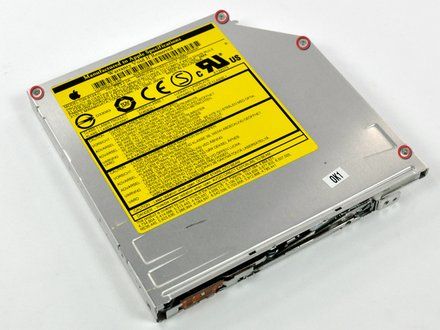
• With the optical drive removed from the computer, remove the screws securing the top panel of the optical drive.

STEP 2::
[step 2 photo] [step 2 photo] [step 2 photo]
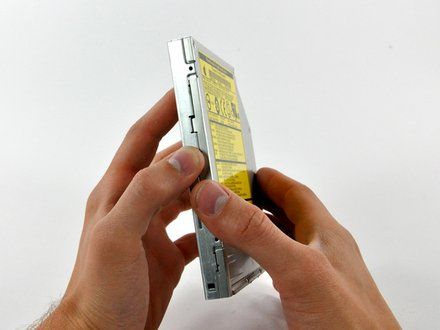
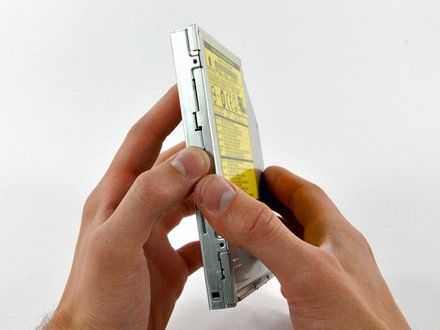
• With the screws removed, shift the top panel slightly toward the rear of the optical drive so the retaining tabs clear the body of the drive.
• Lift the top panel off the optical drive.

STEP 3::
[step 3 photo]
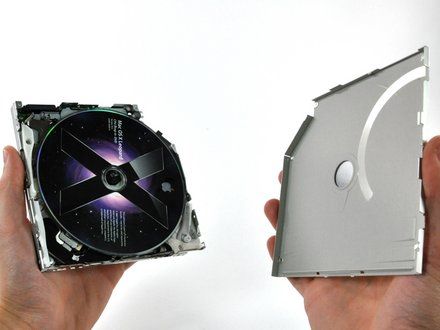
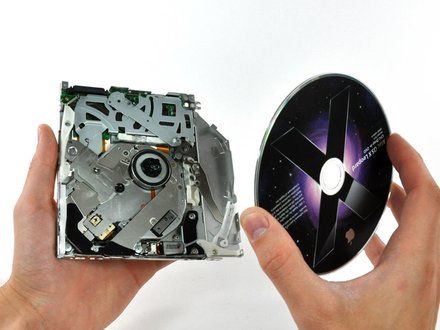
• Remove any objects stuck in the optical drive.
• If a disk is stuck in the drive, simply lift it off the spindle motor.

CONCLUSION::
To reassemble your device, follow these instructions in reverse order.

CREDIT::
This guide is by Andrew Bookholt on iFixit and is licensed under Creative Commons Attribution-NonCommercial-ShareAlike 3.0. ByteRot mirrors it for non-commercial preservation: formatting changed and photos resized for old browsers; full-size photos and the text are on the FTP in /DOCS/REPAIR. Original guide >>
[all repair guides]

[ BYTEROT / OLD BITS FOR OLD MACHINES ]

[ByteRot] [FTP] [IRC] [Any Browser] [HTML 3.2]
© 2026 ByteRot · plain HTML 3.2, no JavaScript: works in Mosaic, Netscape, IE, Lynx and whatever you're using now · best viewed at 800x600 · built 2026-11-18