|  | | Accounts are free. Join #retro on irc.fxnet.org, identify with NickServ and type !req. |
| |
|
|  | | |
| | #retro on irc.fxnet.org
6697 ssl · 6667 plain
modern + vintage clients welcome |
| |
|
| | | |
| | 3 people in #retro
okawari, synmuffin, thelounge76
nobody on the FTP
last upload: Archived Windows 3.0 - 11 ISO B... by archiveorg, 35d ago |
| as of 21:42 EST ·  |
|
|
| | | |
| | | releases | 2,186 | | last 24h | +0 | | online | 1.7 TB | | library | 1.4 TB | | members | 1 | | updated | 2026-11-18 21:42 |
|
|
|
| | | |
| |
| | 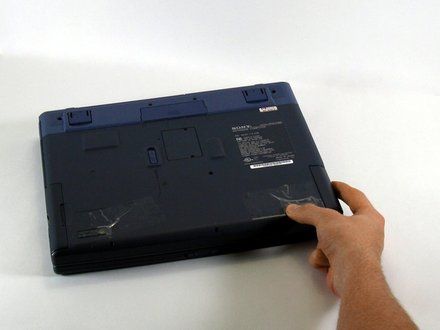
• Position the laptop screen-side down as shown.
• In this position the battery housing will be located on the right hand side.
|
|
|
| | | |
| | 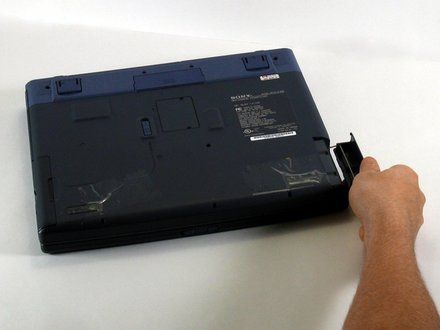
• Lift the panel up and then out to gain access to the battery.
|
|
|
| | | |
| | 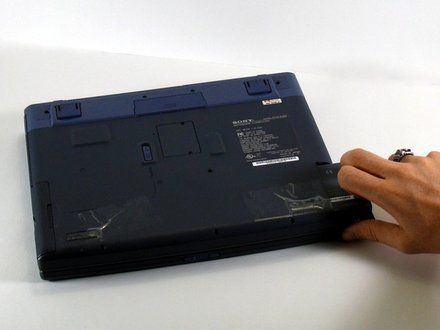
• Use the indentations to pull the old battery out.
|
|
|
| | | |
| | 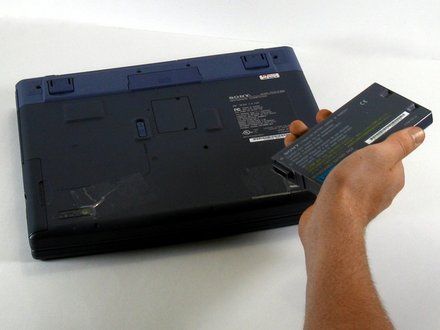
• The battery is now removed and it is safe to move on to uninstalling other components.
|
|
|
| | | |
| | 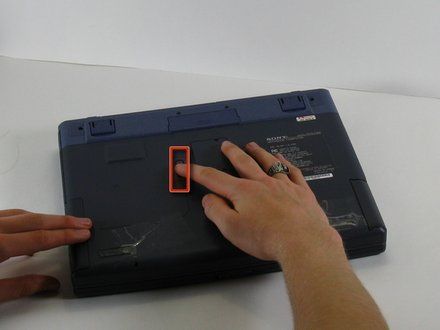
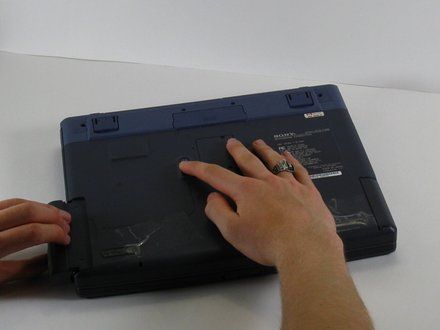
• With one hand slide and hold the tab shown.
• With your other hand, pull the floppy drive out of the floppy drive bay.
• REMINDER: To replace the floppy drive, simply slide the drive into the slot until it clicks.
|
|
|
| | | |
| | | To reassemble your device, follow these instructions in reverse order. |
|
|
| | | |
|


















