|  | | Accounts are free. Join #retro on irc.fxnet.org, identify with NickServ and type !req. |
| |
|
|  | | |
| | #retro on irc.fxnet.org
6697 ssl · 6667 plain
modern + vintage clients welcome |
| |
|
| | | |
| | 3 people in #retro
okawari, synmuffin, thelounge76
nobody on the FTP
last upload: Archived Windows 3.0 - 11 ISO B... by archiveorg, 35d ago |
| as of 21:42 EST ·  |
|
|
| | | |
| | | releases | 2,186 | | last 24h | +0 | | online | 1.7 TB | | library | 1.4 TB | | members | 1 | | updated | 2026-11-18 21:42 |
|
|
|
| | | |
| |
| | 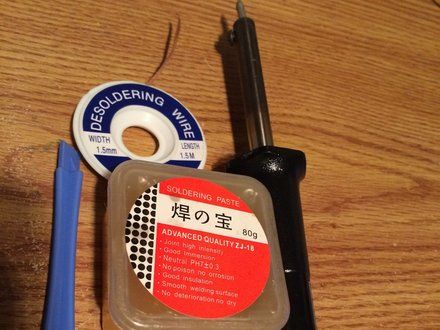
• NOTE: The materials needed for this are a soldering iron, soldering paste and desoldering wire, also known as a wick.
• NOTE: The soldering paste helps the solder flow into the wick better. If you don't have soldering paste, you can get similar results with flux.
|
|
|
| | | |
| | 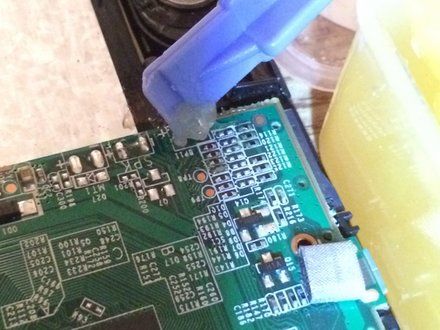
• NOTE: There are many types of soldering paste--many of which are in a syringe-like tube, which makes it easy to get the paste in the exact spot it needs to be.
• NOTE: I personally use a plastic opening tool to scoop a little out and apply it gently on the spot I will be working on.
• NOTE: If you don't have soldering paste, apply some flux to the spot you're working on.
|
|
|
| | | |
| | 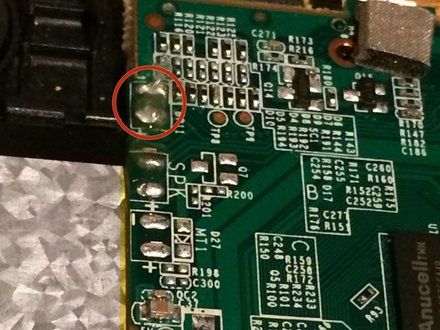
• The location I will be de-soldering is right above the SPK location in the photo.
• CAUTION: If you're de-soldering battery connections, be very careful not to short the contacts with your soldering iron or the solder wick. If possible, cut the battery wires first, one at a time. This removes the chance of accidentally shorting the battery.
|
|
|
| | | |
| | 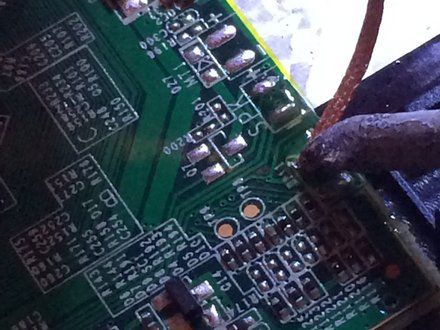
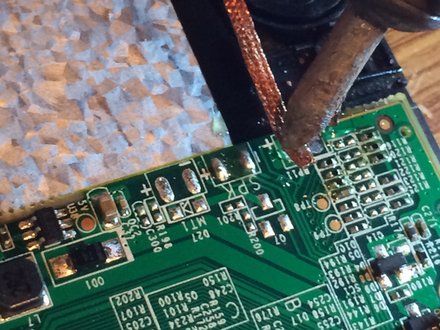
• Place the de-soldering wick on the solder joint and put the tip of the soldering iron on it so the wick can heat up and absorb the old solder.
• Lift the wick and the soldering iron (https://www.ifixit.com/en-ca/products/fixhub-power-series-smart-soldering-iron) up from the logic board at the same time. Failure to do so can cause the leftover solder to harden and solder the wick to the logic board and you could easily pull a logic board pad off.
• CAUTION: Please remember that logic board components are very fragile and excessive heat can destroy these components.
|
|
|
| | | |
| | 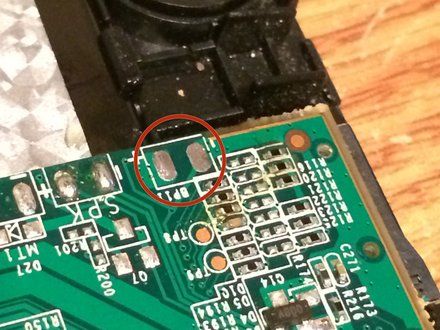
• What's left over is clean points on the solder board, ready for fresh solder.
|
|
|
| | | |
| | | For more soldering guides and tips, check out this page (https://www.ifixit.com/Device/Soldering). |
|
|
| | | |
|





















